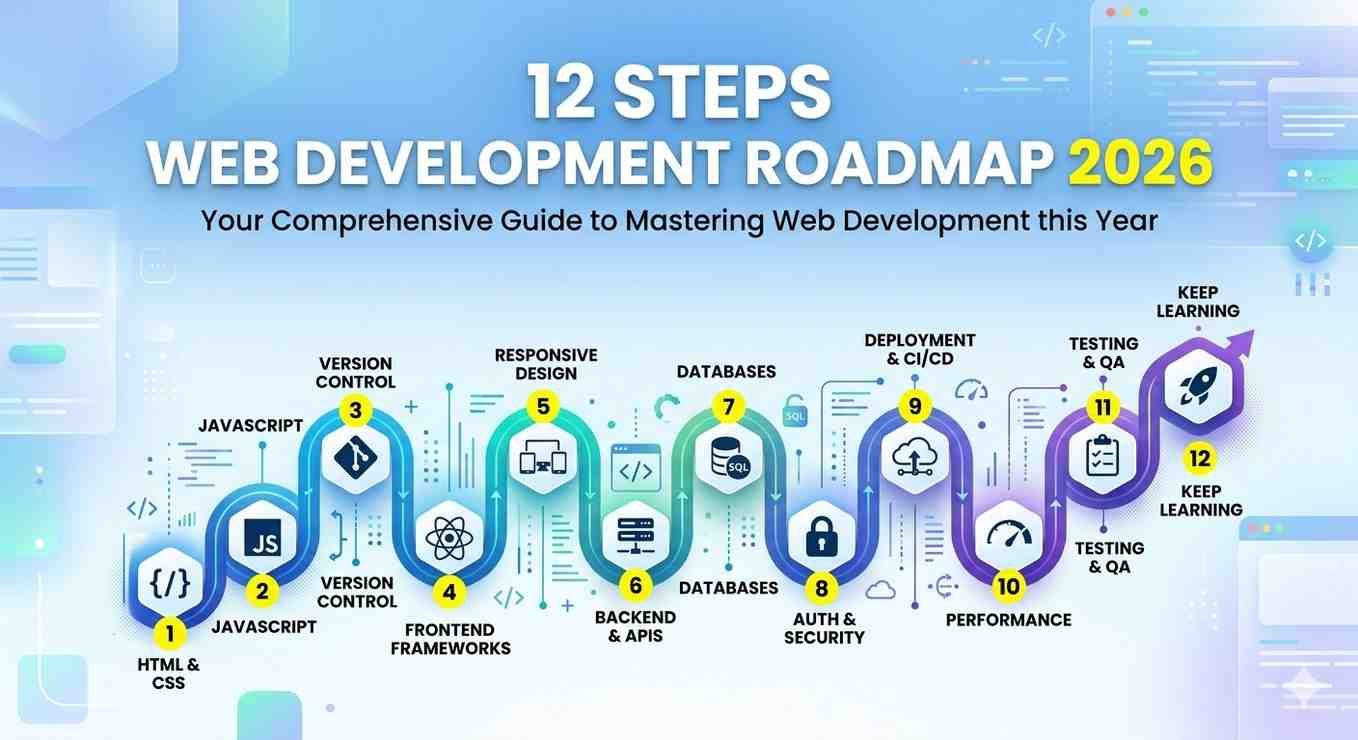
Many people search for a web development roadmap. The situation in 2026 looks different from the past. Artificial intelligence tools changed how developers work. This guide explains what you should learn, how you should learn, and how you turn skills into income. The focus stays on practical learning and real projects.


Reality Check About AI
Artificial intelligence does not remove developer jobs. Artificial intelligence increases developer productivity. A developer with strong fundamentals works faster with AI tools.
Recent developer surveys show about 85 percent of developers use AI tools during daily work. Smart developers focus on decisions and logic. AI handles repetitive tasks. Remember one rule. AI supports work. AI does not replace fundamental knowledge. The AI industry grows fast. Market estimates show a two trillion dollar value during 2026. In 2015 the market size stayed between fifty and one hundred billion dollars. This web development roadmap growth creates demand for developers.
How Web Development Works
Web development has two main parts.
- Front-end
- Back-end
Front end refers to what users see in the browser. Examples include layout, buttons, images, forms, and navigation. Back end refers to server code. The server stores data, processes logic, and sends information to the browser.
Front end technologies
Back end tasks include
- API creation
- Authentication
- Database management
- Server logic
A user interacts with the front end. The front end requests data from the back end. The server responds with HTML, CSS, JavaScript, and data.
Step 1. Learn HTML
Estimated learning time. Three to five days.
HTML stands for HyperText Markup Language. Developers use HTML tags to manage content. HTML forms the structure of a website. Every webpage uses HTML elements such as headings, paragraphs, links, images, and forms. Every webpage on the internet begins with HTML. Learning HTML helps you create simple webpages and forms the first step toward web development.
Key topics
- Semantic HTML
- Forms and inputs
- Images and media
- Accessibility basics
Your goal stays simple. You build a clean webpage structure quickly.
Step 2. Learn CSS
Estimated learning time. Ten to fourteen days.
CSS stands for Cascading Style Sheets. CSS controls visual design. CSS controls layout, colors, spacing, and responsiveness. CSS also handles responsive design so webpages adjust across phones, tablets, and computers. Features such as Flexbox and Grid help create modern layouts. Animations and transitions add motion to page elements. CSS improves readability and user experience. Without CSS, webpages display as plain text with minimal formatting. CSS turns structured HTML pages into visually organized websites.
Important topics
- Flexbox
- Grid layout
- Responsive design
- Media queries
- Basic animations
- Mobile first design
Focus on practical skills. Perfect design knowledge does not matter early. AI tools generate CSS when needed.
Step 3. Learn JavaScript
Estimated learning time. One to two months.
Important topics
- Variables
- Functions
- Arrays
- Objects
- Scope
- Promises
- Async and await
- Fetch API
- Error handling
- DOM manipulation
- Events
- ES6 features
Strong JavaScript knowledge separates beginners from developers.
When To Use AI Tools?
Begin using AI tools after basic JavaScript understanding. Follow one rule.
Think first. Ask AI after thinking. Good uses of AI tools
- Explain programming concepts
- Debug errors
- Generate boilerplate code
- Suggest improvements
Avoid blind copy paste. Developers who rely fully on AI struggle when a bug appears. Clients often reach a point where AI generated code stops working. A skilled developer fixes the problem and earns money for the solution.
Step 4. Build Front End Projects
Projects develop practical skills. Build several useful projects.
Example projects
- Weather application
- Netflix interface clone
- AI chat interface
- Portfolio website
- Landing pages
Each project improves your understanding of user interface logic and browser behavior.
Modern Front End Stack
Modern development uses tools beyond basic HTML and CSS.
Tailwind CSS
Tailwind provides utility classes for faster styling. Many companies use Tailwind instead of older frameworks. Tailwind provides small ready classes which control design directly inside HTML. These classes handle spacing, colors, typography, layout, and responsiveness. Developers combine multiple classes to create page layouts and components.
React
React works as a popular JavaScript library for building user interfaces. React uses components for reusable UI parts. A component represents a small part of the interface such as a navigation bar, button, card, or form. Numerous components are combined by programmers to create a complete application.
React updates the page efficiently through a virtual DOM system. This process updates only the changed parts of the page instead of reloading the entire page.
Key React topics
- Components
- Props
- State
- Hooks
- Routing
- Context API
- State management tools
React allows developers to build complex web applications efficiently.
TypeScript
TypeScript equals JavaScript with strict types. Types prevent common bugs.
In JavaScript, variables can change type, which can cause bugs in large projects. TypeScript enforces types, meaning a variable declared as a number cannot later hold a string. This prevents many runtime errors and makes code easier to read and maintain.
TypeScript works with existing JavaScript code and is widely used with frameworks like React and Next.js. It improves project scalability, code reliability, and developer productivity.
Many companies require TypeScript in modern projects.
Step 5. Learn Backend Development
Backend development works as the part of web development that handles server-side logic, databases, and application functionality. The backend processes data, communicates with the frontend, and ensures the website or app works correctly. Front end shows information. Back end manages data and business logic.
Important backend topics
- Request and response system
- Routing
- Middleware
- REST APIs
- Error handling
- Environment variables
- Project structure
Node.js and Express.js serve as common backend tools. They allow developers to use JavaScript on the server.
Step 6. Learn Databases
Databases store and manage data for applications. They allow websites and apps to save information, fetch it, and update it when needed. Every application stores information. Databases handle this task.
Two major database types exist.
- SQL databases
- NoSQL databases
SQL examples
MySQL & PostgreSQL
NoSQL example
MongoDB
Use MongoDB for flexible data structures and quick prototypes .Use SQL databases for systems requiring strict relationships, reporting, and transaction safety. Developers use MongoDB for applications that need fast prototyping, scalability, and flexibility. It is commonly used with JavaScript, Node.js, and frameworks like Express.js.
Example
Bank systems require transaction consistency. SQL databases handle these scenarios better. A strong developer understands both database types.
Step 7. Build Backend Projects
Practical backend experience matters.
Example projects
- Authentication system
- CRUD applications
- REST APIs
- Full stack dashboards
Combine front end, backend, and database in real applications.
Step 8. Learn Next.js
Next.js acts as a full stack framework built on React. Next.js combines frontend and backend in a single project. Next.js adds features to React, such as server side rendering, static site generation, and routing, making websites faster and more SEO friendly. Developers use Next.js to build both frontend and backend in a single project. It supports API routes for server logic and connects easily with databases.

Important Next.js topics
- Routing system
- Dynamic routes
- Server actions
- API routes
- Middleware
- Authentication
- Client and server components
- Performance optimization
Next.js simplifies production level web application development.
Step 9. Become A Full Stack Developer
Full stack development works as the combination of frontend and backend development. A full stack developer builds both the user interface that users interact with and the server-side logic that powers the application. A full stack developer understands three areas.
- Frontend development
- Backend development
- Database systems
These skills allow you to build complete applications.
Companies value developers who manage full systems instead of isolated tasks.
How To Earn Money From This Web Development Roadmap
Job opportunities
Companies hire web developers across many industries. Junior to mid level developers earn strong salaries in many regions. Remote jobs increase earning potential because developers work for international companies, Freelancing opportunities, Developers build websites for businesses.
Common freelance projects
- Business websites
- Landing pages
- Dashboards
- Software tools
- AI powered applications
AI tools increase delivery speed. Faster delivery allows developers to serve more clients.
12 Month Web Development Roadmap Action Plan
Months 1 to 3
Learn HTML, CSS, and JavaScript fundamentals. Use AI tools as tutors for explanations.
Months 4 to 6
Learn React and Tailwind CSS. Build several frontend projects.
Months 7 to 9
Learn backend development using Node.js and Express. Learn databases and build full stack applications.
Months 10 to 12
Build a strong portfolio website. Create profiles on freelance platforms. Apply for developer jobs and begin client work.
Final Perspective
Developers in 2026 perform a different role from earlier years. A developer guides AI tools and solves real problems. Strong fundamentals combined with AI tools create faster development and higher productivity.

Focus on learning fundamentals, building projects, and solving real problems. This web development roadmap leads toward employment, freelance work, and long term growth in web development.
For Your Help
Related Blogs Must Check: 30-Day Backend Frontend Roadmap
How to Write Authentic Content : Unlocking the Secrets of Authentic Content Creation for All