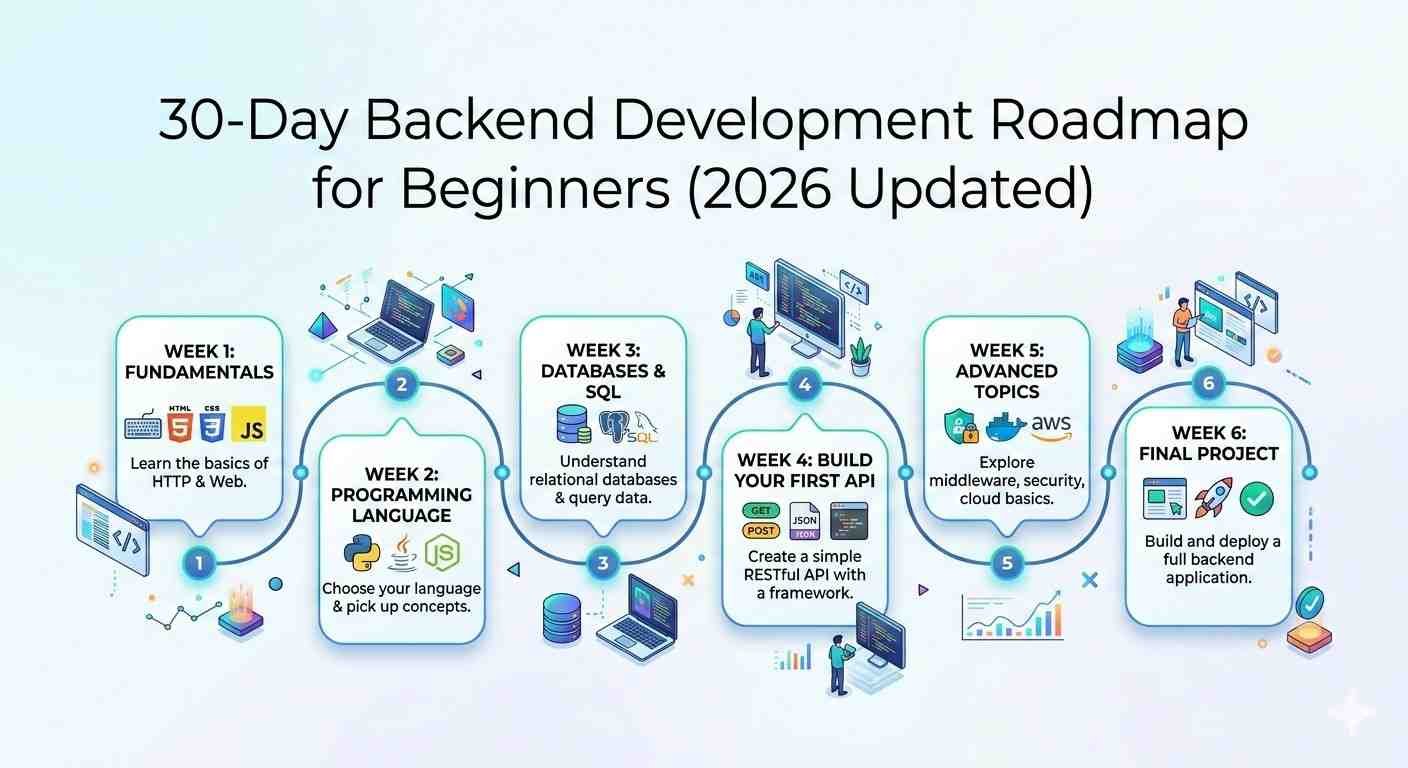
This Backend development roadmap is the part of web development that works behind the scenes; it makes websites and apps functional. Before this Backend Development Roadmap, make sure to learn that front-end developers handle what users see, backend developers manage servers, databases, and application logic. You can use languages like Node.js, Python, Java, or PHP and databases like MySQL, PostgreSQL, or MongoDB to create web applications that actually work.
Authentic Writes is a digital publication built on one principle: clarity with credibility. We create well-researched, practical, and insight-driven content designed to inform, educate, and empower readers across the globe.
Why this backend development roadmap?:
It may seem difficult at first because there are many languages and tools; the best way is to follow a clear plan and practice every day. This 30-day plan will take you from basics to building your own backend project.
Week 1: Learn the Basics of a Backend Language
So you’re ready to dive into this Backend Development Roadmap? Awesome! Here’s the deal – you got to pick your weapon first. I’m talking about choosing between Node.js (yeah, that’s just JavaScript on the server side), Python, or PHP. Don’t worry too much about which one; honestly, go with the one that makes you happy. Everything you don’t see on a website is based on these languages. You know, the magic that happens behind the scenes, like keeping track of passwords, managing what users post, and basically keeping everything from falling apart.
This week is all about nailing the fundamentals. Trust me, skip this part and you’ll regret it later. Here’s your roadmap:
Variables and data types – Picture these as containers. You throw in numbers, text, shopping lists, whatever. It’s how your program remembers stuff.
Conditions and loops – Conditions are basically your code asking questions and making decisions (“Is this person old enough to sign up? Yes? Okay, let them in”). Loops save you from going insane by letting you do repetitive tasks automatically instead of copying and pasting code a million times.
Functions – These bad boys are game-changers. Write your code once, stick it in a function, then use it whenever you want. No more rewriting the same thing everywhere.
Working with files – You need to know how to save stuff and pull it back up later. Otherwise, where are you gonna keep all those usernames and passwords and whatever else people create on your site?
Once you’ve got a handle on these concepts, build something real. Doesn’t have to be ground-breaking – maybe just a simple task tracker where you can add stuff, check what’s there, and cross things off. Sounds basic, right? But you’ll actually pick up so much from this. You’re practicing how to handle data, deal with user input, and show them results. That’s literally what backend development is all about.
Look, don’t try to become an expert overnight. Just focus on understanding how things work. Code a bit each day – seriously, even if it’s just 20-30 minutes while you’re drinking your coffee. Consistency beats cramming every single time.
Where to learn this Backend Development Roadmap (for free!):
- Node.js official guide – clean, no-nonsense explanations
- Python.org tutorials – super friendly for complete beginners
- PHP beginner guide – starts from scratch, doesn’t assume you know anything
- freeCodeCamp backend courses – completely free, really well put together, tons of hands-on practice
freeCodeCamp courses for backend languages.
Week 2: Learn About Servers and HTTP
Alright, so websites don’t just magically appear on your screen. There’s a whole conversation happening between your browser and a server somewhere. They chat using something called HTTP – think of it as their language.
Here’s what you need to figure out:
- HTTP methods – These are like different types of requests. GET grabs information, POST sends new stuff, PUT updates things, and DELETE… well, you can guess what that does.
- How servers actually respond – When you ask for something, the server doesn’t just ignore you. It sends back a response with the info you wanted (or an error if something went wrong).
- Status codes and headers – You’ve probably seen “404 Not Found” before, right? That’s a status code. There are tons of them, and they tell you what happened with your request.
Try this out: Make a super basic server with Express (if you picked Node.js) or Flask (if you’re doing Python). Just get it to show “Hello, World!” when someone visits. Sounds silly, but it clicks something in your brain when you see it actually work.
What you’re really learning here: How browsers and servers have their little back-and-forth conversation. You’ll get routing too – basically directing traffic to different pages.
Check these out:
- Express.js docs – straight to the point
- Miguel Grinberg’s Flask tutorials – this guy explains things really well
- MDN Web Docs on HTTP – great reference when you need to look stuff up
Week 3: Learn About Databases in Backend Development Roadmap
So your app needs to remember things, right? That’s where databases come in. You’ve got two main flavors: SQL databases (like MySQL or PostgreSQL) and NoSQL ones (MongoDB is popular).
What to wrap your head around:
- CRUD operations – Create, Read, Update, Delete. Literally the four things you do with data. Add new users, look up their info, change it, or remove it completely.
- Connecting your app to the database – Your code needs to talk to where the data lives.
- Organizing your data properly – Bad structure now means headaches later. Think about what information you need and how it all relates.
Build this: A small app that saves and finds user info or maybe a list of tasks. Keep it simple – you’re just practicing how to work with stored data.
The main point: Learn how to design your database so it makes sense, write queries to get exactly what you need, and maybe use an ORM (fancy tool that makes database stuff less painful).
Learn from here:
- MongoDB University – totally free courses
- W3Schools SQL stuff – super beginner-friendly examples
- PostgreSQL documentation – reference when you need specifics
Week 4: Learn Authentication and Security
People trust you with their information. Don’t screw that up. This week is all about security.
You need to learn:
- Building login and signup pages – The basics of letting people create accounts and get back in.
- Password security – NEVER store passwords as plain text. You hash them (scramble them in a one-way process).
- Using JWT tokens – These let users stay logged in without you having to remember everything about them constantly.
- Different user levels – Some people are regular users, some are admins. They shouldn’t all see the same stuff.
Make this happen: Build a real login system. Hash those passwords, create protected pages that only logged-in users can see.
Big picture stuff: Authentication (proving who you are), authorization (what you’re allowed to do), keeping data encrypted, managing sessions, and why HTTPS matters.
Resources worth checking:
- JWT.io – breaks down how tokens work
- Node.js security best practices
- OWASP security basics – these folks know their stuff
Week 5: Learn RESTful APIs and Advanced Concepts
APIs are how your backend talks to frontends or other services. They’re kind of a big deal.
Focus on this:
- Building REST APIs – The standard way to structure your API so it makes sense.
- Handling all the requests and responses – And what to do when things go wrong (because they will).
- Checking user input – Never trust what users send you. Always validate it.
- Middleware and async stuff – Middleware is code that runs between the request and response. Async keeps your app from freezing while waiting for slow operations.
Project idea: Create an API for a blog or task manager. Let people add posts, read them, edit them, delete them. All through API calls.
Core concepts: Understanding endpoints (the URLs your API uses), handling things asynchronously so your app doesn’t hang, and using middleware effectively.
Study these:
- Express.js API guides
- Django REST Framework tutorials (if you went with Python)
- Postman guides – super helpful for testing your APIs
Week 6: Deployment, Tools, and Final Project
Last week! Now you’re gonna take everything you built and put it on the actual internet. Plus learn the tools pros use every day.

Get comfortable with:
- Git and GitHub – Track your code changes, collaborate with others, don’t lose your work.
- Environment variables – Keep sensitive info (like API keys) separate from your code.
- Hosting platforms – Heroku, AWS, Vercel – pick one and get your app live.
- Keeping tabs on your app – Monitoring and logging so you know when stuff breaks.
Your final boss battle: Build one complete backend application that has:
- A database connection
- User login system
- Working API endpoints
- And actually lives on the internet where people can use it
What ties it all together: Version control habits, deployment know-how, managing different environments (development vs production), and following best practices so your code doesn’t make other developers cry.
Final resources:
- GitHub Learning Lab – interactive and actually fun
- Heroku deployment walkthroughs
- AWS free tier – they give you free stuff to learn with
- Deployment guides specific to your language
This plan is easy to follow: each week builds on the previous one; by the end, you can make a complete backend app and understand how real-world websites work
Each week adds another layer to what you learned before. Six weeks from now, you’ll have built a real backend app and actually understand what’s happening under the hood of websites. Not bad, right?
For Your Help
Related Blogs Must Check: 30-Day Backend Frontend Roadmap
How to Write Authentic Content : Unlocking the Secrets of Authentic Content Creation for All